Wake with a sunrise
Your screen brightens gradually toward the time you set. Choose a sunrise duration and alarm sound that feel right for you.
Gentler mornings · Android
Let a warm screen sunrise ease you into the day. Set the alarm that fits your morning, then keep optional sleep insights on your phone.
Free light alarmNo accountSleep estimates stay on your phone
Your morning, your pace
Keep your wake-up simple, shape it around your week, and preview the sunrise before you settle in.
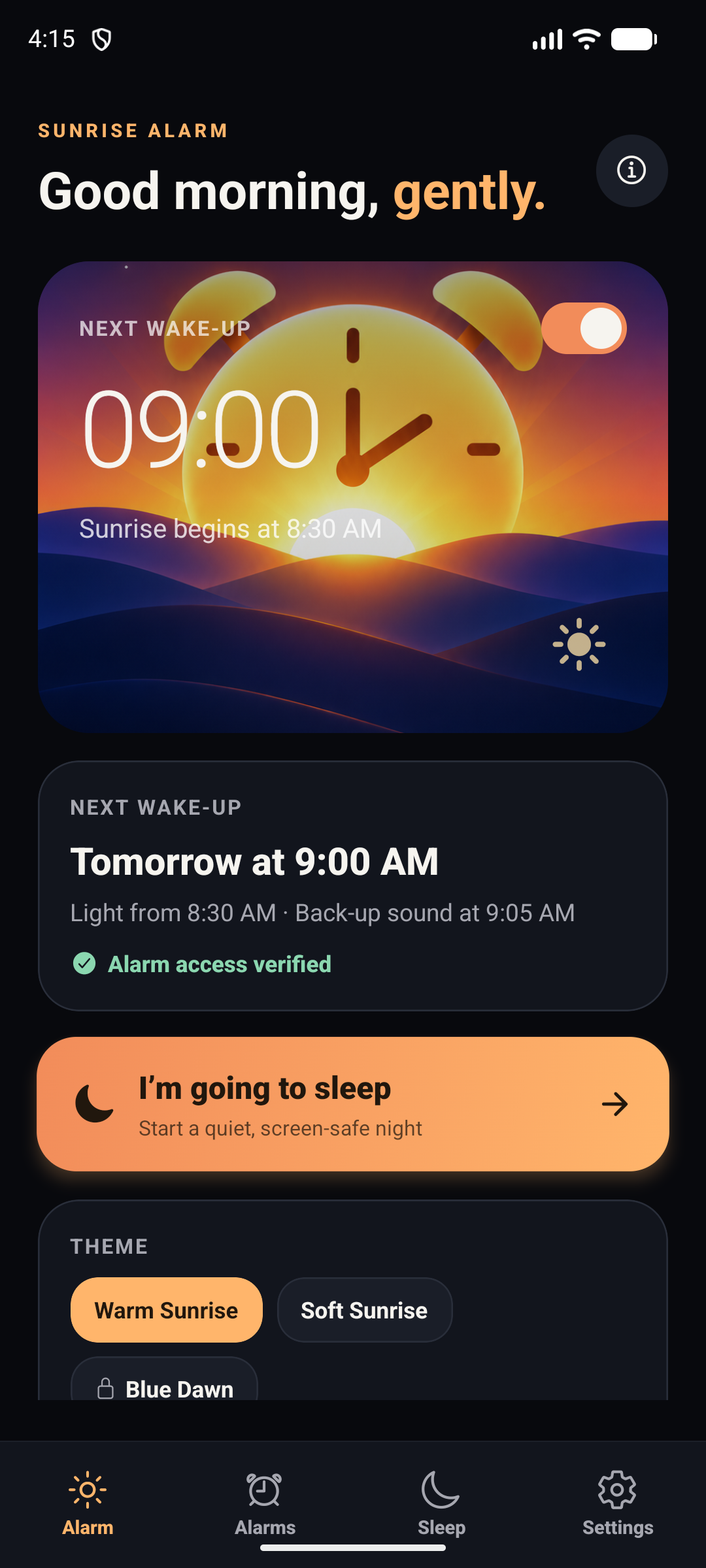
Your screen brightens gradually toward the time you set. Choose a sunrise duration and alarm sound that feel right for you.
Set several alarms for different days and routines. Snooze, a 20-second sunrise preview and a separate back-up sound are built in.
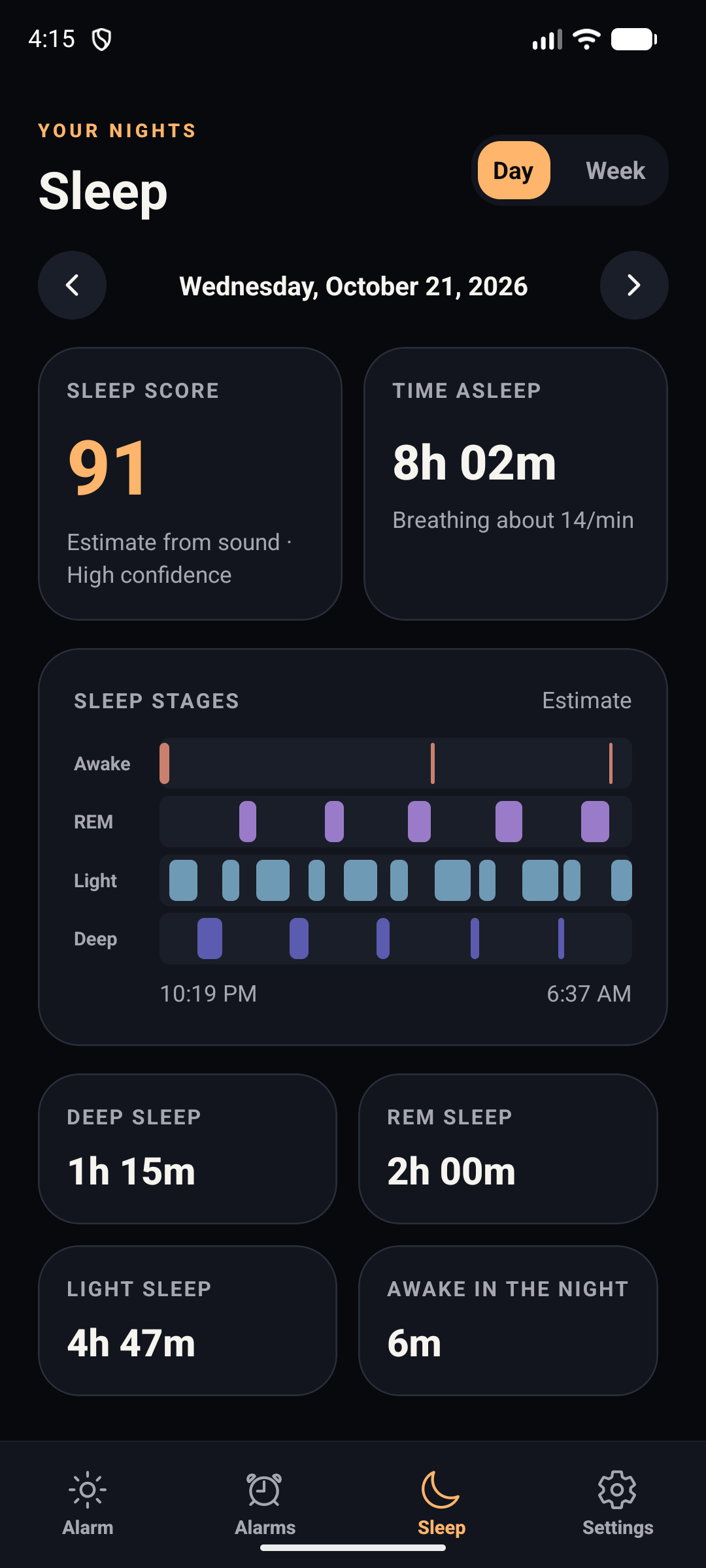
Turn on optional tracking for estimated sleep stages, time asleep, breathing rate and a morning score—processed on your phone.
A look inside
Take a look at the alarm, your saved schedules and the optional sleep report.
See the next alarm and start Sleep Mode when you are ready.
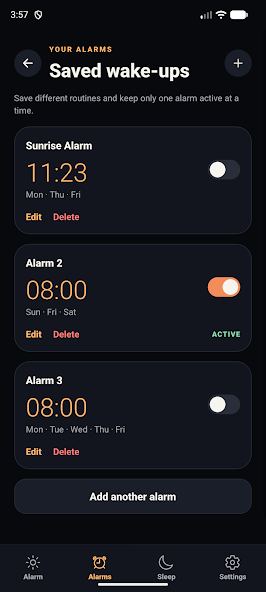
Keep more than one schedule ready for the days ahead.
See estimates and patterns from nights you choose to track.
Sleep report screens use sample values for illustration. Sleep estimates are not medical measurements.
Your sleep stays yours
When you turn Sleep Tracking on, the app processes live microphone samples on your device to estimate sleep patterns. Raw audio is not stored or uploaded, and you can use the light alarm without tracking.
Start free. Choose what suits you.
Sleep tracking is optional. Sunrise Pro adds more ways to personalise the app and continue tracking.
FREE · ALWAYS
SUNRISE PRO · OPTIONAL
Google Play shows the current price, billing period and renewal terms before purchase.
The light alarm is free. Sleep tracking is optional.
Your information
How Sunrise Alarm handles information, permissions, advertising and purchases.
Last updated: 22 October 2026
Sunrise Alarm is published by Lunava Software. Contact lunavasoftware@gmail.com with privacy questions, deletion requests or complaints.
The app stores alarm times, repeat days, selected sounds, theme choices, sleep-tracking settings, local purchase entitlements and sleep records on this phone. A sleep record may include when Sleep Mode started and stopped, when the alarm sounded, your morning rating and, when tracking was enabled, estimated sleep stages, a sleep score and a breathing estimate. The app also stores a short list of technical alarm events, such as “alarm scheduled” or “back-up sound started”.
Sunrise Alarm has no account, backend, analytics service or cloud sleep database. The app does not upload its local sleep database or alarm events and does not store raw microphone recordings. You can view and choose to share alarm events from Settings.
Sleep Tracking is optional and starts only when you turn it on. After you enable it and grant microphone permission, Sleep Mode processes live microphone samples on this device to estimate breathing rhythm, movement and noise. About every 15 seconds, it keeps a few derived numbers such as sound level, the loudest peak and breathing rhythm; these interval numbers are deleted after that night's analysis. The app uses the results to estimate sleep stages and a sleep score on this device.
Raw audio is processed in memory and is not stored or uploaded. The estimates are not medical measurements. The first three successful tracking nights are free; recording further nights needs Sunrise Pro. Nights you already recorded remain viewable.
Ads are requested only after Google's User Messaging Platform has updated your consent choices and only when the matching AdMob identifiers are configured. Google Mobile Ads may process device or advertising identifiers, your IP address, coarse location inferred from network data, diagnostics, device information and ad-delivery information under Google's terms. Ads appear only on the home screen, never in Sleep Mode or while you stop the alarm.
Ads are not requested when your consent choices do not allow them or after you buy Sunrise Pro or the earlier Remove Ads purchase. See Google's Privacy Policy for details about Google's processing.
Sunrise Pro is available as a monthly or yearly auto-renewing subscription, or as a lifetime one-time purchase. Pro removes ads, unlocks premium themes and sounds, and allows unlimited nights with sleep tracking. The current localized price, billing period and renewal terms are shown by Google Play before you confirm a purchase. Monthly and yearly subscriptions renew automatically unless you cancel them in Google Play before the next billing period. The lifetime option is paid once and does not renew.
Remove Ads is a separate one-time purchase that removes ads but does not unlock other Sunrise Pro features. Earlier one-time purchases, including Blue Dawn and premium sounds, keep working. Google Play processes payments, renewals, cancellations and refunds. Sunrise Alarm does not receive or store your card number. The app stores the entitlement needed to unlock a purchased feature and checks the store account to restore it. Pending payments do not unlock features.
Notifications are used for alarm reminders. Exact-alarm access is used on supported Android devices for a wake-up alarm you create. Optional Sleep Tracking requests microphone access when Sleep Mode starts and processes audio locally. Brightness, wake-lock and orientation access support Sleep Mode. You can deny permissions, but the related feature may not work.
The app may ask Google Play to show its in-app review dialog after a few completed nights. It never asks while you are waking up and does not filter who is sent to the store.
Sunrise Alarm does not share the local sleep database. Alarm events remain on your device unless you choose to share them from Settings. Google Mobile Ads and Google Play or Apple are third-party services for advertising and purchases. They may process information under their own terms and outside your country, subject to their safeguards. Sunrise Alarm does not intend to sell sleep metrics.
Local alarm and sleep features are provided at your request. You can turn off optional sleep tracking and advertising choices where the app provides that control. Depending on where you live, you may have rights to access, correct or delete information, restrict or object to processing, and withdraw consent. Email lunavasoftware@gmail.com to exercise your rights. You may also contact your local data-protection authority.
Local data remains on your device until you delete it in Settings, reset the app or uninstall it. Device backups or operating-system migration may retain app data according to your device settings. Email the contact above for help with data questions. Purchase entitlements are controlled by Google Play or Apple and may be restorable from the corresponding store account after reinstalling.
The app uses parameterized local database queries and keeps sleep processing on your device in the current build. No security measure is perfect. Keep your operating system and app updated, and do not use prototype sleep estimates for security or medical decisions.
Sunrise Alarm is not directed at children and does not knowingly collect children's personal information. If you believe a child has provided personal information, contact lunavasoftware@gmail.com.
This policy may change when features, advertising partners or store integrations change. The date at the top identifies the current version.
Contact: lunavasoftware@gmail.com.